In this series
- 1. Port
- 2. Server
- 3. IP Address
- 4. Proxy
- 5. Encryption
- 6. API Key
- 7. Container / VM
- 8. Skill / Plugin
- 9. Policy
- 10. Audit Log
Welcome to the first entry in our OpenClaw series. I'm putting this together as I've witnessed numerous techies trying to explain how to deploy and secure OpenClaw, but it's so far right in the technical direction that it gets lost in translation.
Why are we covering “port” first? Speak with a non-techie or investor who is hyped up about agentic AI and OpenClaw, and that's surprisingly one of the first questions I've gotten.
Not to get confused...

These are called ports too...but we're talking virtual ones.
A port is like an extension number on an office phone line. The main number gets you to the building, the extension gets you to the right person. Ports range from 0 to 65,535, and only apply to networked apps like OpenClaw. Your calculator app doesn't need one.
Applications running on ports are accessed by appending the port number to the URL:
http://localhost:18789
for the OpenClaw gateway
postgresql://user:password@localhost:5432/mydb
for a PostgreSQL database
Ports to know
Port 80
Every plain “http” URL on the web goes through port 80, but these days most websites only expose 443. Only relevant if you're setting up a reverse proxy, which is a separate topic.
Port 443
All “https” websites are served here. https://www.google.com is running on port 443 behind the scenes.
Port 18789
The OpenClaw gateway. This is where you configure and chat with it.
Port 18793
If you want to see what your OpenClaw agent is doing visually, from a browser on any machine, this is the port that serves it. Only runs if you have canvasHost.enabled: true set in your openclaw.json.
Port 18791
No need to expose this. It's an internal endpoint that handles browser lifecycle operations like starting and stopping a browser process. OpenClaw manages it itself.
There are other ports OpenClaw uses internally. Consult the documentation for the full list.
Why does securing ports matter?
If you're running OpenClaw on your own machine at home or in the office, your router blocks incoming traffic by default. You're reasonably safe.
But if you're running OpenClaw on a VPS (like DigitalOcean or Hostinger), your system is directly on the internet with a public IP. That changes things.
This is where port scanning comes in. Automated bots scan the entire internet continuously, knocking on every port of every IP address. When they find port 18789 open with no login, they're in. The reason so many OpenClaw instances got hit is that users spun up one-click installs and left the dashboard exposed with no authentication. CrowdStrike research found over 42,000 publicly exposed OpenClaw instances, with 93.4% having authentication bypass vulnerabilities. And given OpenClaw has free access to your files, browser, and connected accounts, that's a disaster waiting to happen.
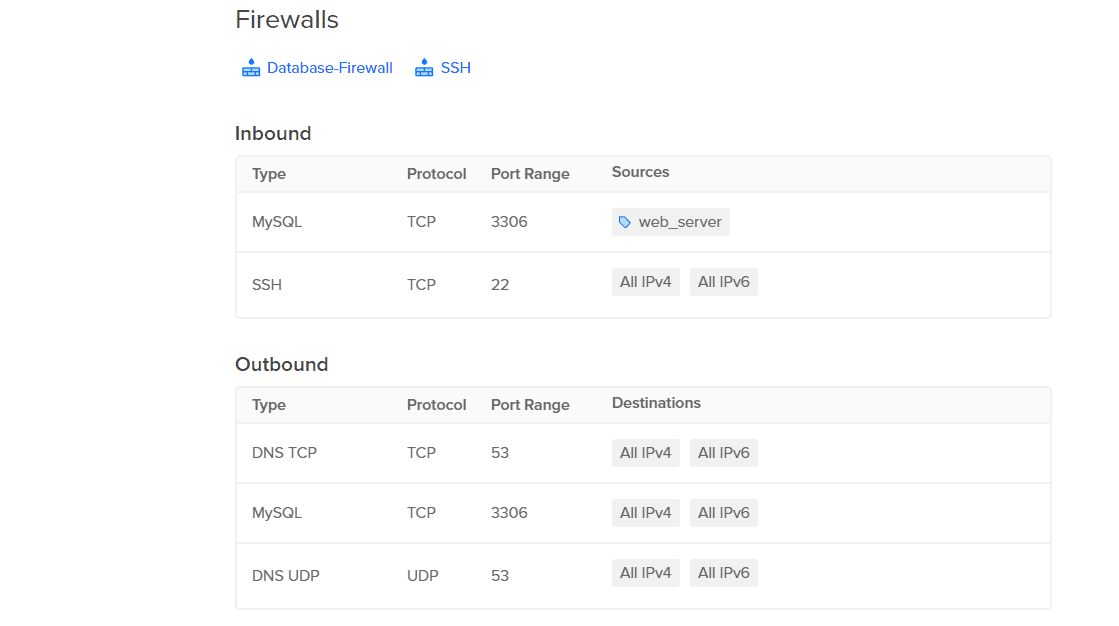
This is what managing ports looks like in DigitalOcean. Manageable if you know what you're doing, but one wrong rule and you've left a door open.
What can you do about it?
A few straightforward options:
1. Run it locally in a sandbox
This is how OpenClaw was intended to be used. Docker and VirtualBox are both well-documented paths.
2. Lock down your VPS firewall
If you're on a VPS, only open port 18789 to your own IP. Go to whatismyip.com, grab your IPv4 address, and set that as the allowed source in your provider's firewall settings (usually called Security Groups or Firewall Rules in the dashboard).
3. Use a private network
A VPN like TailScale makes your VPS invisible to the public internet entirely, no port exposure needed. This is the most robust approach. Tropic uses WireGuard and AWS SSM for machine-to-machine connectivity.
Tropic handles all of this for you.
Port 18789 is never exposed to the public internet. Every OpenClaw instance runs behind a VPN with firewall rules locked down by default. No configuration needed.